

Start with the destination
The best subtitle format is one your intended player, publishing platform or recipient accepts. If they ask for a particular format, start there. When you have a choice, consider the appearance you need and how you want to deliver the subtitles.
For straightforward subtitles, SRT is often a practical starting point. For a website's video player, look at WebVTT. For detailed styling and positioned text, consider ASS with a player that supports it.
SRT, WebVTT or ASS?
At a glance
| Format | A useful choice for | What to keep in mind |
|---|---|---|
SRT (.srt) |
Straightforward subtitles for video uploads and sharing | Appearance is largely controlled by the player; styling support varies. |
WebVTT (.vtt) |
Captions in web video players | Positioning and styling depend on what the player supports. |
ASS (.ass) |
Detailed typesetting, positioned text and effects | Both your editing tools and the final player need to support the features you use. |
SRT: simple text and timing
An SRT file stores subtitle text and the times when it should appear. Many video platforms, editing tools and media players accept it, making it a convenient choice for everyday work.
For example, an interview uploaded to YouTube can use SRT for basic captions. Do not rely on custom fonts, colors or positioning carrying through: YouTube ignores SRT styling, and other players handle it differently.
WebVTT: subtitles for the web
WebVTT is designed for text tracks in web video. Alongside words and timing, it can describe where captions appear and provide information for styling them.
If you are adding a lesson to a website, WebVTT can let the player position a caption above a speaker's name or another graphic. Check which features your chosen player supports; uploading a VTT file does not guarantee that every style will be used.
ASS: more control over appearance
ASS supports detailed styling, including fonts, outlines, positioned text and karaoke effects. It is useful when subtitles need to do more than sit at the bottom of the picture, such as translating a sign within a scene.
Choose it when those visual details matter and your workflow supports them. A player that accepts basic subtitles may not reproduce ASS effects.

Separate files, embedded tracks or burned-in text?
The format describes your subtitles. The delivery method determines how they travel with the video and what viewers can do with them.
Separate subtitle files
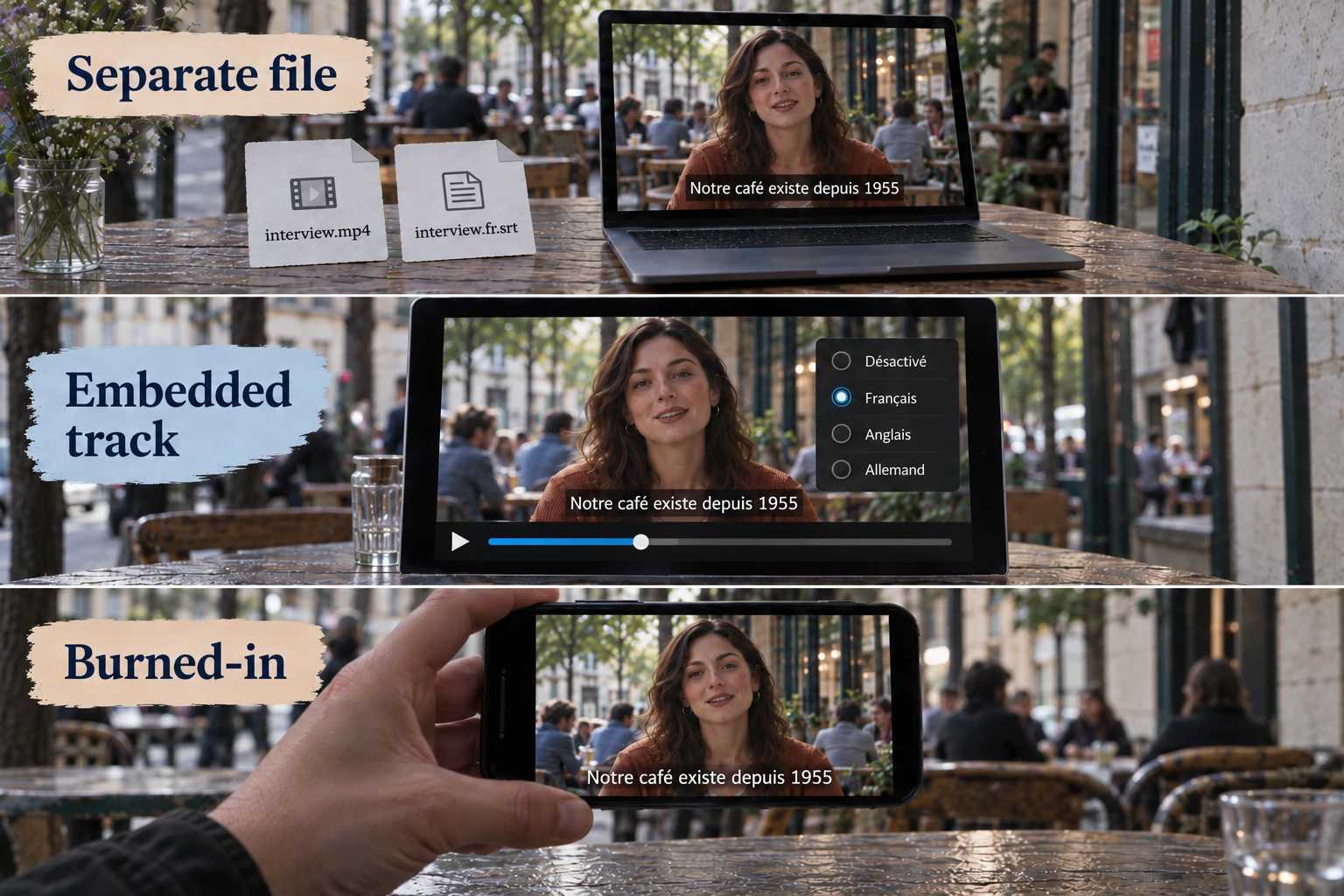
A separate file, also called a sidecar, accompanies the video: for example, interview.mp4 and interview.en.srt. You can replace the subtitles or add another language without rendering the video again. This is useful for platforms that accept subtitle uploads. When sharing files directly, include both files and use clear names.
Embedded subtitle tracks
An embedded track sits inside the video container alongside the picture and audio. One file can carry several subtitle languages for viewers to select or turn off in a compatible player. This can be convenient for offline sharing, but the container and player must support the chosen subtitle track.
Burned-in subtitles
Burned-in subtitles become part of the picture. They stay visible without a subtitle setting, which can suit short social videos and display screens. Viewers cannot turn them off or switch their language independently. Correcting the text requires a new video render, so keep an editable subtitle source as well.
What conversion can change
Converting a styled ASS file to SRT can keep the words and timing while losing its fonts, positioning and effects. Converting that SRT back to ASS will not recreate the missing design. Keep the original file and inspect the converted result.
SubFT imports and exports SRT, WebVTT and ASS. Some original ASS styling may be lost during editing and export; ASS styling support is planned. The file-support guide explains the current export options and limitations.
Check the exported result
Open the exported subtitles in their intended player or platform before sharing them. Check the beginning, middle and end:
- Are the subtitles in sync with the speech?
- Is the text readable, with sensible line breaks and placement?
- Do accents, punctuation and right-to-left text appear correctly?
- If the subtitles are selectable, can viewers choose the intended language?
If the wording is awkward or the timing drifts, another format will not fix it. Review the subtitles before export, then check the delivered result once more.